Same Seed, Different World: Why Minecraft Terrain Changes After an Upgrade
A Minecraft seed is only one of three inputs — the game version and the world settings matter just as much. In an upgraded world, old chunks never change, new ones use new rules, and since 1.18 they blend at the border. Every reason the same seed gives different terrain, how to check which one you hit, and what can be restored.
By Shujaat Ahmed · · 8 min read
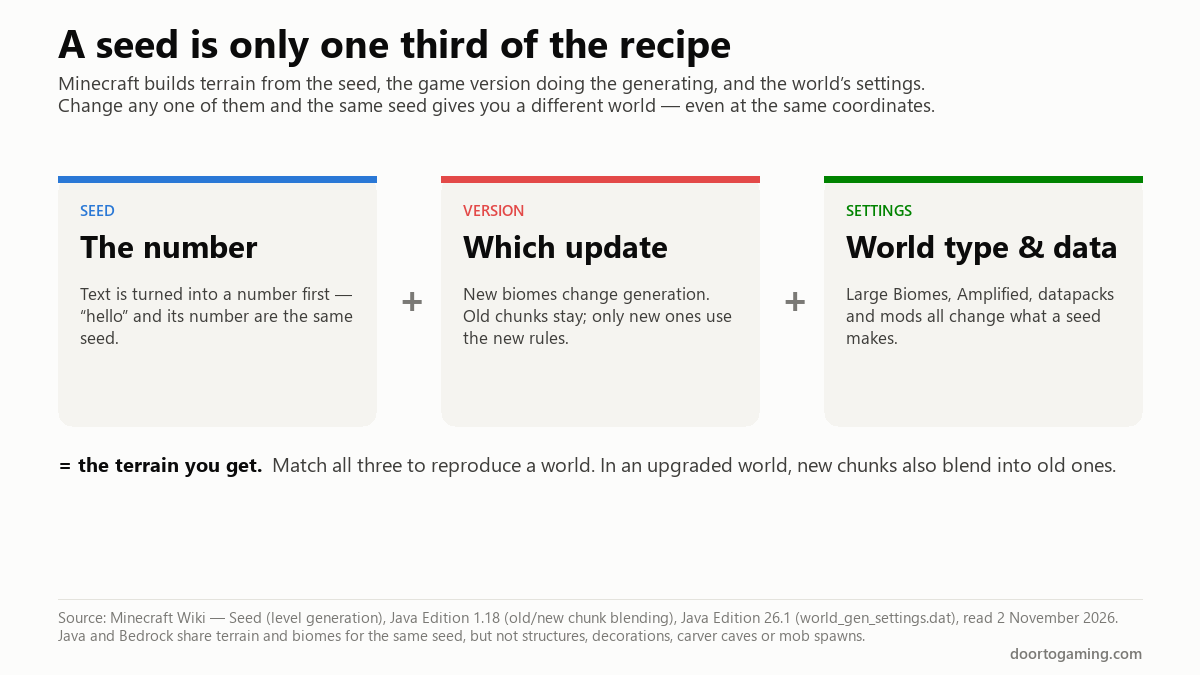
The same Minecraft seed only makes the same world if the game version and the world settings match too. A seed is one input of three. The version that generates the terrain is another — Mojang changes the generator whenever it adds biomes, and the same seed then produces a different landscape. The world's settings are the third: world type, datapacks and mods all change the result.
And in a world you have upgraded, there is a fourth factor most explanations miss: the chunks you already explored never change, new chunks use the new version's rules, and since 1.18 the game blends the two together at the border. That is why a seed can give you three different results at the same coordinates, and why the one you remember may be impossible to get back exactly.
Here is every reason it happens, how to check which one you are hitting, and what you can — and cannot — restore.
The three inputs
The Minecraft Wiki's description of seeds is precise about the first two: "Whenever the world generation algorithm is updated (usually by adding new biomes to the game), the same seed no longer generates the same terrain." The seed is the same number; the recipe that reads it has changed.
| Input | What it is | What changes it |
|---|---|---|
| Seed | A 64-bit number | Typing text instead of the number, or a typo |
| Version | The update doing the generating | Any update that changes world generation |
| Settings | World type, datapacks, mods | Large Biomes, Amplified, a worldgen datapack or mod |
Reproduce all three and you reproduce the world. Change one and you do not.
Every reason the same seed looks different
1. A different game version
This is the most common cause by far. Seeds shared online are usually from a specific version, and if you play a later one, the terrain at those coordinates may not match.
The biggest break in recent years was 1.18, which rebuilt Overworld generation from the ground up: taller mountains, deeper caves, a new world height. A seed from 1.17 or earlier produces a completely different world in 1.18 and later. Smaller updates that add or move biomes can change parts of a world too.
Check: find out which version the seed was shared for, and use that version. The official Minecraft Launcher can install older releases from the Installations tab.
2. Old chunks stay, new chunks don't match
When you open an existing world in a newer version, nothing you have already explored is regenerated. Only chunks generated for the first time use the new version's rules. So a long-running world is a patchwork: each area looks like the version it was first visited in.
That means a fresh world made from the same seed will match your old world only in the areas you first explored on the same version you are now testing in.
3. Blending between old and new chunks (1.18 and later)
Before 1.18, an upgraded world had hard, visible seams where old terrain ended and new terrain began — cliffs cut straight down, rivers that stopped dead. Since 1.18, the game smooths the border between chunks made before 1.18 and chunks made after. The Minecraft Wiki's summary of the 1.18 changes puts it this way: "The biomes and terrain from old and new chunks now seamlessly blend, preventing the hard cut borders from before." Chunks store extra data for this.
The side effect: a chunk generated next to pre-1.18 terrain is shaped partly by that old terrain. A fresh world with the same seed has no old terrain to blend with, so it generates the same spot differently. And if you delete a chunk and let it regenerate, it is built against whatever surrounds it now, not what surrounded it the first time.
4. You typed text, not the number
A seed can be a word or a phrase, but Minecraft turns text into a number first. The Wiki explains that text is converted "into a 32-bit integer using the .hashCode() method." So "hello" and the number it converts to are the same seed — but a seed shared as a number must be typed as that number, digits only (a leading minus sign is fine). Add a space, a letter or a stray character, and the game treats it as text and produces a different world.
Check: in Java Edition, type /seed in the world. It shows the actual number in use, and works in singleplayer even with cheats off.
5. A different world type
Large Biomes, Amplified, Superflat and Single Biome all use the seed differently from the default. If you created the world on "Default" and a friend on "Large Biomes," the same seed gives two different worlds.
6. Datapacks and mods
Any datapack or mod that changes world generation — new biomes, new terrain shapes, structure mods — changes what a seed produces. Two worlds with the same seed and version but different worldgen mods will not match.
7. Java and Bedrock
Since the 1.18 updates, Java and Bedrock share terrain generation. The Wiki is specific about the limit: the same seed generates "the same terrain and biomes in both Java and Bedrock Edition. However, structures, features (i.e. decorators), carver caves, and mob spawns will generate differently." Mountains and biomes match; villages, trees and some caves will not.
A real case: three different terrains at one coordinate
On Arqade, Stack Exchange's gaming site, a player described a world that had travelled from Beta 1.9 → 1.8.9 → 1.21.10 → 26.1.2. At one spot, first visited in 1.21.10, they now had three different terrains: the original they had recorded, a fresh world with the same seed (identical in every version they tested, from 1.19 to 26.1.2), and a third result after deleting the chunk and letting it regenerate. The question had 580 views and no accepted answer.
Here is what the mechanics above say, and where the honest limits are.
Why the fresh world matches across 1.19–26.1.2 but not the original. A clean world at those coordinates generates with nothing around it but the same seed. The original terrain was generated inside a world full of older chunks. If any pre-1.18 terrain was close enough to blend, the original was shaped by it, and no fresh world can reproduce that.
Why the regenerated chunk is different again. Deleting one chunk and regenerating it means it is built against its neighbours as they are today, in 26.1.2 — not the neighbours and version it was first built against. That is a third set of inputs, so it is a third result.
What we cannot confirm from outside the world file. The player said the nearby chunks were never generated before 1.21.10, which would rule out blending as the full explanation. The one answer on the thread points somewhere else worth checking: in 26.1, Mojang moved world generation settings out of level.dat into a separate file, world_gen_settings.dat. A world that has passed through Beta, 1.8.9 and several conversions could carry generator settings that are not the plain default, and those would affect new chunks in a way a fresh world never shows. Comparing that file against a brand-new world's is the next thing to check.
Can the original terrain be restored? Not by regenerating it. The original was produced by a specific version, settings and surrounding terrain at one moment. The reliable route is a backup from before the upgrade; without one, the original survives only in recordings.
How to protect a world before upgrading
- Back up before every major update. Copy the world folder. It is the only guaranteed way back.
- Note the version a seed belongs to when you share or save one, along with the world type.
- Use
/seedinstead of memory. It shows the exact number your world uses. - Test a seed in a copy first. Open a copy of the world in the new version, fly to the areas you care about, and compare before committing.
- Explore what matters before you update if you want those areas generated by the version you love — chunks that already exist will not change.
The short version
- A seed is only one of three inputs: the seed, the game version and the world settings. All three must match to get the same world.
- Updates change generation. 1.18 rebuilt the Overworld entirely; smaller updates that add biomes change parts of it.
- Upgraded worlds are a patchwork. Old chunks never change; new chunks use the new rules; since 1.18, chunks next to pre-1.18 terrain blend into it, which no fresh world can reproduce.
- Text seeds become numbers. Check the real one with
/seed. - World type, datapacks and mods change everything. Java and Bedrock share terrain and biomes, but not structures, trees or carver caves.
- You cannot regenerate lost terrain exactly. Back up before upgrading.
Tags: Minecraft Minecraft Update Minecraft Java Minecraft Bedrock Mojang Minecraft seeds world generation chunk blending Minecraft 26.1
Written by Shujaat Ahmed
Shujaat Ahmed is the founder and editor of Door To Gaming. A lifelong gamer, he writes about the games, hardware, and industry news he cannot stop thinking about.