Minecraft Bedrock Shaders in 2026: Java Packs Don’t Work, and You Might Not Need Any
Complementary, BSL and Sildur’s are Java packs — they cannot load on Bedrock at all. But Bedrock now ships Mojang’s own Vibrant Visuals free and built in, and on console it is the only option you have. What works, on which platform, and how to install the packs that do.
By Shujaat Ahmed · · 6 min read
If you have been reading shader lists and wondering why none of the famous names install on your copy of Minecraft, here is the short version: Complementary, BSL, Sildur's and SEUS are Java Edition packs, and they do not work on Bedrock at all. Not "work badly" — they cannot be loaded. Different game, different rendering engine, different file format.
The longer and more useful version is that Bedrock's situation in 2026 is genuinely better than Java's in one respect, and most lists bury it: Mojang now ships its own shader, it is free, it is built into the game, and on consoles it is the only option you have.
Why Java shader packs don't work on Bedrock
Java Edition shaders run through OptiFine or Iris, which hook into Java's OpenGL renderer. Bedrock does not have that renderer and cannot load those files.
Bedrock runs on RenderDragon, Mojang's own engine, and it accepts a completely different kind of pack — deferred rendering packs built specifically against RenderDragon, distributed as .mcpack files rather than the .zip shaderpacks Java uses.
So the first thing to establish before you download anything is which edition you own. If you launch from the Minecraft Launcher and the title screen says Java Edition, our guide to Java shaders is the one you want. If you are on a phone, a console, or the Windows version from the Microsoft Store, you are on Bedrock, and this is the right page.
Vibrant Visuals: the shader Mojang ships
This is the part that changes the answer for most Bedrock players.
Vibrant Visuals is fully released on Bedrock Edition, built into the game, and free. It is not a mod, a pack or a download. It is a graphics mode you switch on.
What it actually adds:
- Directional sun and moon lighting with pixel-aligned shadows
- Physically based textures — surfaces respond to light according to their material
- Volumetric fog with light shafts, and biome-specific atmospheric effects
- Water caustics and considerably better water rendering
- Dynamic reflections and emissive surfaces that actually glow
- Post-processing — bloom, auto-exposure and tone mapping
That list covers most of what people install a third-party shader to get. For a large number of players the honest recommendation is to turn this on and stop there.
One notable asymmetry: Java Edition does not have it yet. Mojang is rebuilding Java's renderer onto a dedicated thread and moving it from OpenGL to Vulkan before Vibrant Visuals can arrive there. For once, Bedrock got the feature first.
How to turn Vibrant Visuals on
- Open Settings → Video.
- Find the Graphics Mode dropdown. It expands into a checklist.
- Tick Vibrant Visuals.
Two things worth knowing once it is on. There are presets for Favor Visuals and Favor Performance, which is where to go first if your frame rate drops. And expanding Vibrant Visuals Options lets you turn individual effects off — useful on weaker hardware, where volumetric fog and reflections are usually the expensive ones.
It is a player-side setting, not a world setting, so it applies everywhere and does not need to be re-enabled per world.
What your platform actually supports
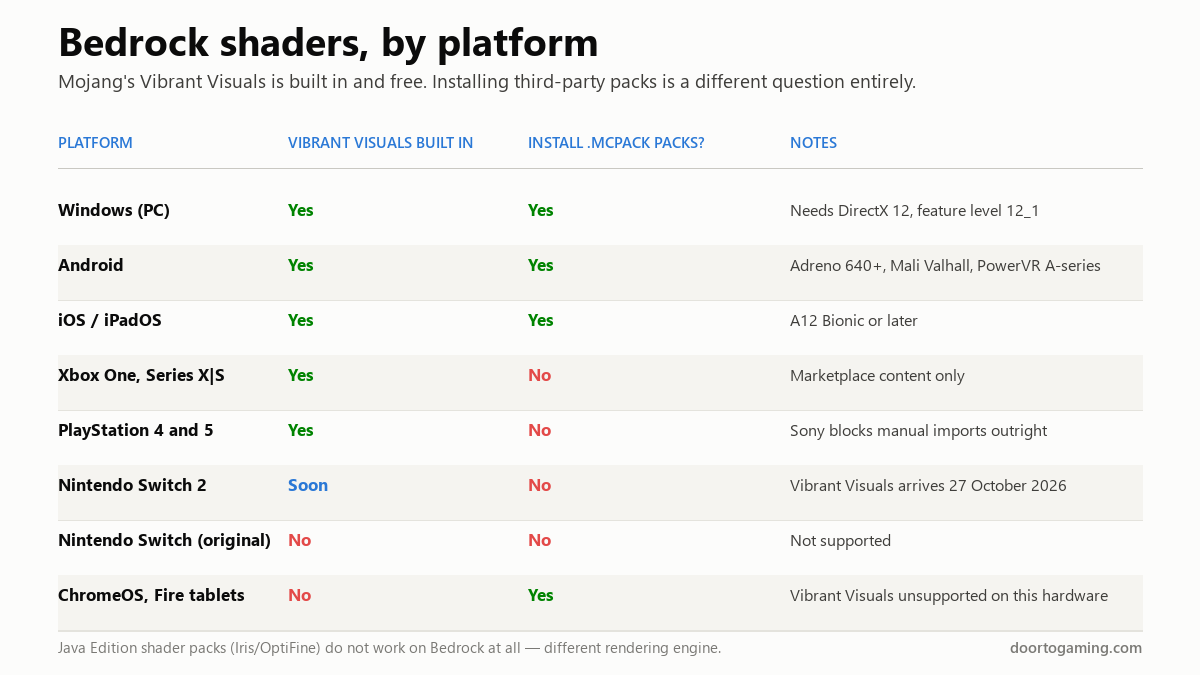
This is where most confusion lives, because "can I use shaders on Bedrock" has two different answers depending on whether you mean Mojang's or someone else's.
The hardware requirements for Vibrant Visuals are real and specific: Windows needs DirectX 12 at feature level 12_1, Android needs an Adreno 640 or newer, Mali Valhall, or PowerVR A-series GPU, and iOS needs an A12 Bionic or later. ChromeOS, Fire tablets and the original Nintendo Switch are not supported at all.
Nintendo Switch 2 gets Vibrant Visuals on 27 October 2026 — worth knowing if you have one and have been wondering why the option is missing.
The Bedrock packs worth installing
If you are on PC, Android or iOS and want to go past Vibrant Visuals, these are the RenderDragon-compatible packs people actually use in 2026:
- Prizma Visuals Legacy — detailed PBR textures, 3D bump effects and atmospheric skies, and it supports the official Vibrant Visuals mode rather than fighting it.
- Newb Shader — the lightweight pick. Soft, clean, vanilla-adjacent aesthetic, supports Bedrock 1.21+ on Windows, Android and iOS. The one to try first if your device is modest.
- Luminous Dreams — a deferred rendering pack built around warm lighting and glowing atmosphere. More stylised than realistic.
- BSLB Shaders — Honey Studios' Bedrock take on BSL, with the same warm lighting, fog and cloud treatment the Java original is known for. The closest you will get to the Java look.
- RG Shader — realistic fog, godrays and waving leaves and water, explicitly built to run on low-end devices. The best option for older phones.
On PC specifically there is also BetterRenderDragon, a third-party utility that unlocks deferred rendering features the game does not expose by default. Useful, but it is an external tool rather than a pack, and it comes with the usual caveats about unofficial software.
How to install a .mcpack
Straightforward on the platforms that allow it:
- Download the
.mcpackfile. - Open the file. Minecraft imports it automatically — you do not move it into a folder manually.
- Go to Settings → Global Resources → My Packs.
- Select the pack and activate it.
If a pack does nothing after activating, the usual cause is a version mismatch: RenderDragon packs are built against specific Bedrock versions and quietly fail on others.
If you are on PlayStation, Xbox or Switch
Here is the limitation nobody puts at the top of their list, and it is the one that matters most to console players.
You cannot sideload shader packs on console. On PlayStation in particular, Sony's closed ecosystem blocks manual .mcpack imports outright — there is no workaround short of modifying the console, which is not something worth doing to your hardware for better water.
What you get on console is the Marketplace, and Vibrant Visuals. The good news is that Vibrant Visuals is supported on Xbox One, Xbox Series X|S, PS4 and PS5, and is the single biggest visual upgrade available to you — so the feature is genuinely there, it simply arrives from Mojang rather than from a pack site.
Quick answers
- Do Java shaders work on Bedrock? No. Different engine, different format. OptiFine and Iris are Java-only.
- Does Bedrock have shaders built in? Yes — Vibrant Visuals, free, in Settings → Video → Graphics Mode.
- Is Vibrant Visuals on Java? Not yet. It needs Java's move from OpenGL to Vulkan first.
- Can I install shaders on console? No sideloading. Marketplace content and Vibrant Visuals only.
- Best lightweight Bedrock shader? Newb Shader, or RG Shader on older phones.
- Closest to the Java look? BSLB Shaders by Honey Studios.
- Switch 2? Vibrant Visuals arrives 27 October 2026.
While you are tuning the look of your world, the dimension Mojang is building next is worth a read — we went through everything confirmed about The Sift, the first new dimension in 14 years, and what the Sulfur Caves biome actually contains.
Tags: gaming news PC Gaming console gaming Minecraft shaders Minecraft Minecraft Bedrock Game Settings Vibrant Visuals RenderDragon Bedrock Edition
Written by Shujaat Ahmed
Shujaat Ahmed is the founder and editor of Door To Gaming. A lifelong gamer, he writes about the games, hardware, and industry news he cannot stop thinking about.