SteamOS or Windows? Check One List Before You Read a Single Benchmark
Every comparison is about battery, frame rate and the interface, and SteamOS wins three of the four. None of that is the decision. The decision is a short list of games whose publishers have refused Linux — Fortnite, Valorant, Apex, Siege, Call of Duty, Battlefield 6 — and whether any of them are yours. Two minutes against your library settles it; then the benchmarks matter.
By Shujaat Ahmed · · 9 min read
Every SteamOS-versus-Windows comparison you will read is about the same four things: battery, frame rate, the interface, and whether Windows updates interrupt your game. All four are real, and on three of them SteamOS wins outright.
None of them is the decision. The decision is a list of games, and it is short enough to check against your own library in about two minutes. If none of them are on it, SteamOS is the better operating system for a handheld and it is not especially close. If one of them is, the rest of this article does not matter.
Check this list first
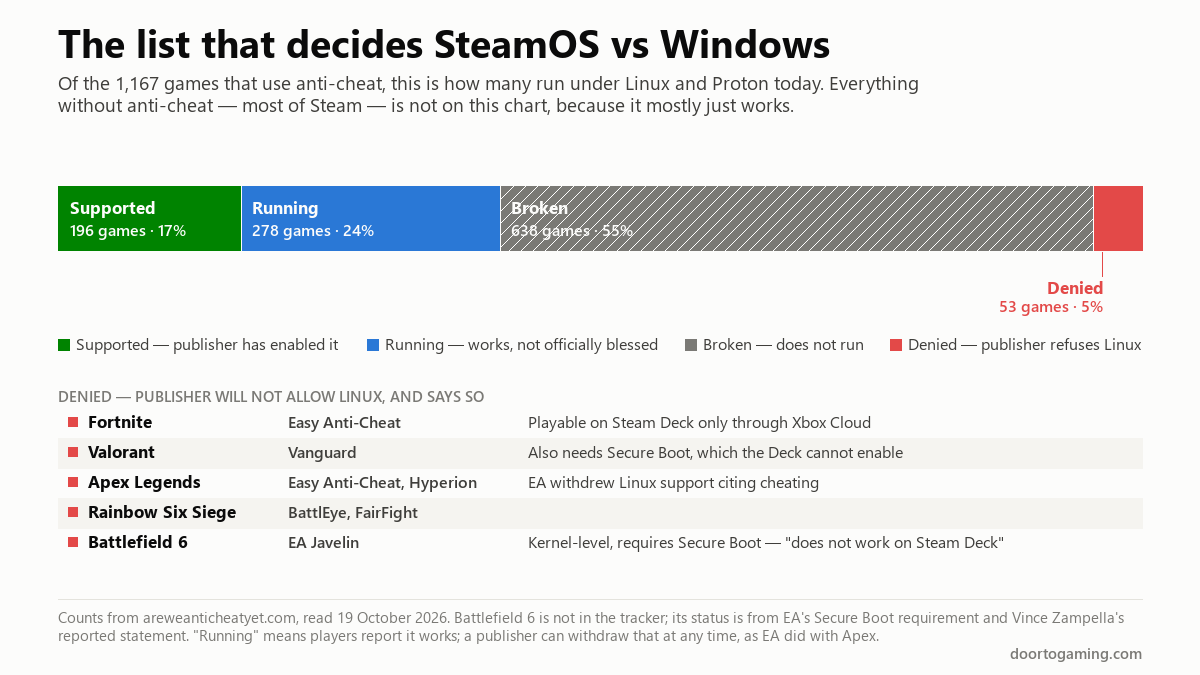
areweanticheatyet.com tracks every game that ships with anti-cheat and whether it runs under Linux. As of this week it covers 1,167 titles, and the split is not flattering:
- Supported — 196 games, 17%. The publisher has switched Linux support on.
- Running — 278 games, 24%. Players report it works; nobody has promised it will keep working.
- Broken — 638 games, 55%. Does not run.
- Denied — 53 games, 5%. The publisher has said no.
So 41% of games with anti-cheat work and 59% do not. Before that number alarms you: the tracker only lists games that have anti-cheat, and most of Steam does not. A single-player game with no multiplayer component is not on this chart, and those overwhelmingly run.
The problem is which games are in the 59%. The five that matter most are all in the smallest, hardest category — Denied, where the publisher has not merely failed to support Linux but has refused it:
- Fortnite — Easy Anti-Cheat. Denied. The tracker notes it is playable on Steam Deck through Xbox Cloud, which is a stream, not an install.
- Valorant — Vanguard. Denied, and it also requires Secure Boot, which matters later.
- Apex Legends — Easy Anti-Cheat and Hyperion. Denied. EA withdrew Linux support citing cheating, after having previously allowed it.
- Rainbow Six Siege — BattlEye and FairFight. Denied.
- Call of Duty — GamingOnLinux's guide, updated June 2026, puts Warzone alongside Fortnite and Valorant in the "absolutely will not work (and likely never will)" bracket.
Add Battlefield 6, which the tracker does not yet list. EA's Javelin anti-cheat is kernel-level and requires Secure Boot, and EA's Vince Zampella was reported saying flatly that it "does not work on Steam Deck." PUBG is listed as Broken rather than Denied, which in practice is the same answer today with a slightly more hopeful future.
What does work is worth listing too, because it is not nothing: Counter-Strike 2, Marvel Rivals and ARC Raiders are all in the working column on the same guide. Helldivers 2, Elden Ring and most co-op games run fine. The wall is specifically the big free-to-play shooters and the EA catalogue.
If you play any of those regularly, stop here. Windows is the answer, and no amount of battery life changes it.
If you cleared the list, here is what you gain
The numbers below are from a single well-controlled test — Dave2D ran the same Lenovo Legion Go S, same Ryzen Z2 Go, same 55Wh battery, under both operating systems in May 2025 — so treat them as one careful data point rather than a law. They are widely cited because almost nobody else has done the like-for-like comparison properly.
Frame rates, Windows 11 to SteamOS:
- Cyberpunk 2077 — 46 to 59 fps, a 28% gain
- The Witcher 3 — 66 to 76 fps, 15%
- Doom Eternal — 66 to 75 fps, 14%
- Spider-Man 2 — dropped a frame on SteamOS. It was the exception.
Battery, same games, same hardware:
- Cyberpunk 2077 — 1h 31m on Windows, 1h 54m on SteamOS. 25% longer.
- Hades — 1h 58m to 4h 17m. 2.2 times longer.
- Dead Cells — 2h 47m to 6h 12m. 2.2 times longer.
Those last two are the ones to notice. In a demanding game the GPU dominates power draw and the operating system is a rounding error, so the gain is modest. In a light game the GPU is barely working, and what remains is the operating system's own overhead — which is where Windows, running its background services and telemetry regardless of what you are doing, spends your battery for you. Dave2D attributed the gap mainly to exactly that.
One honest caveat from the same table: the Steam Deck OLED, with a smaller 50Wh battery, lasted 4h 33m in Hades against the Legion Go S's 4h 17m on SteamOS. The operating system is a large part of the story. It is not the whole of it.
What Microsoft has done about it
Microsoft's answer is the Xbox full screen experience, which became available on all Windows 11 handhelds on 21 November 2025 and in preview on laptops and desktops. It hides the desktop, puts a controller-driven launcher in front of you, and suspends non-essential background work while you play.
It is a real improvement to the handheld experience, and reviewers who have used it say so — the ROG Xbox Ally X20 we looked at ships with it, and still carried Windows as the category's most persistent weakness. What is notable is what Microsoft's own announcement does not say: it makes no performance claim, and no battery claim, with or without numbers. The language is "a smoother, more seamless way to play." Reviewers who have put it against SteamOS on the same hardware still report SteamOS ahead — the mode trims what Windows does in the background, but it does not remove it.
It also changes nothing about the list above. The anti-cheat problem is a Linux problem and the full screen experience is a Windows feature, so if you want those games, Windows with the full screen experience is now a noticeably better version of the thing you were going to use anyway.
Which hardware actually gets SteamOS
This is where expectations run ahead of reality. Valve's SteamOS 3.7.8 release notes say exactly two things about non-Deck hardware: "Added official support for the Lenovo Legion Go S" and "Improved support for other AMD powered handhelds (like the ROG Ally and original Legion Go)."
Read those carefully, because they are different sentences.
- Steam Deck and Legion Go S — official. Lenovo ships the Go S with SteamOS preinstalled under Valve's "Powered by SteamOS" licensing, and it is the device Dave2D's numbers come from.
- ROG Ally, original Legion Go, and other AMD handhelds — "improved support." It installs and people run it happily, but you are the support department.
- Intel handhelds — the MSI Claw and anything else on Intel graphics is where the Intel support we covered applies, and it remains narrower than the headlines implied.
If you are choosing a handheld because you want SteamOS, the Legion Go S is the one that is actually sold that way. Everything else is a project — usually a successful one, but a project.
The dual-boot escape hatch, and why it is smaller than it looks
The obvious compromise is both: SteamOS for everything, a Windows partition for the one game on the list. On a desktop that works. On the Steam Deck specifically it runs into a wall that has nothing to do with Linux.
Valorant and Battlefield 6 both require Secure Boot. The Steam Deck's firmware does not expose a Secure Boot option — owners report there is simply no switch for it — and while unofficial workarounds exist, they can break with any Windows update and can leave the SteamOS side unbootable. So installing Windows on a Deck gets you Fortnite and Apex. It does not get you Valorant or Battlefield 6, which are two of the games people most often install Windows for.
Third-party handhelds generally do have Secure Boot, so this is a Deck-specific problem. But it is the one that catches people who assumed "I'll just dual-boot" solved everything.
So, which?
SteamOS, if you cleared the list. More frames, dramatically more battery in anything light, suspend and resume that just works, and no update rebooting you out of a game. Buy a Legion Go S or a Steam Deck to get it without a weekend of setup.
Windows, if you did not. Fortnite, Valorant, Call of Duty, Apex, Siege and Battlefield 6 are not coming to Linux on any timeline their publishers have shared, and several have gone the other direction. Use the full screen experience — it is genuinely better than bare Windows was — and accept the battery cost as the price of those games.
Dual-boot, only if the game you need does not require Secure Boot — or you are on a handheld that has it. Check before you partition.
The comparison everyone writes is real but secondary. The list is primary. Two minutes against your own library settles it, and nothing in a benchmark table can overrule what it tells you.
The short version
- Decide on the anti-cheat list, not the benchmarks. Of 1,167 games with anti-cheat, 59% do not run on Linux, and the five that matter most — Fortnite, Valorant, Apex, Siege, Call of Duty — are explicitly Denied. Battlefield 6 joins them.
- If none of those are yours, SteamOS wins clearly. On identical Legion Go S hardware: 28% more frames in Cyberpunk, and 2.2 times the battery life in Hades and Dead Cells. The light-game battery gap is Windows's background overhead, and it is large.
- The Xbox full screen experience helps Windows and claims nothing. Microsoft's own announcement makes no performance or battery claim. Reviewers still put SteamOS ahead on the same hardware.
- Only the Steam Deck and Legion Go S are official. Valve's notes say "official support" for the Go S and "improved support" for the ROG Ally and original Legion Go. Those are not the same sentence.
- Dual-booting a Deck does not rescue Valorant or Battlefield 6. Both need Secure Boot, and the Deck has no switch for it.
Tags: VALORANT Fortnite SteamOS Linux Gaming Windows 11 Steam Deck Legion Go S ROG Ally handheld gaming PC anti-cheat Proton Xbox full screen experience
Written by Shujaat Ahmed
Shujaat Ahmed is the founder and editor of Door To Gaming. A lifelong gamer, he writes about the games, hardware, and industry news he cannot stop thinking about.