Frame Generation Is Not Free: Why More FPS Can Feel Worse
Turn frame generation on and the counter doubles while aiming feels slightly worse. That isn't a bug — to build a frame between two real ones, the first has to be held back until the second exists. Here's the mechanism, what the latency actually costs, why it needs a good frame rate rather than rescuing a bad one, and when to leave it off.
By Shujaat Ahmed · · · 7 min read
You turned frame generation on. The counter jumped from 60 to 110. The game looks smoother — and aiming feels very slightly worse than it did before.
You aren't imagining that, and it isn't a bug. It's how the feature works. Frame generation buys you smoothness by spending responsiveness, and the trade is built into the mechanism rather than bolted on by a bad implementation.
Which is worth understanding properly, because it determines who should turn it on — and the answer is close to the opposite of how most people use it.
The mechanism, and why the trade is unavoidable
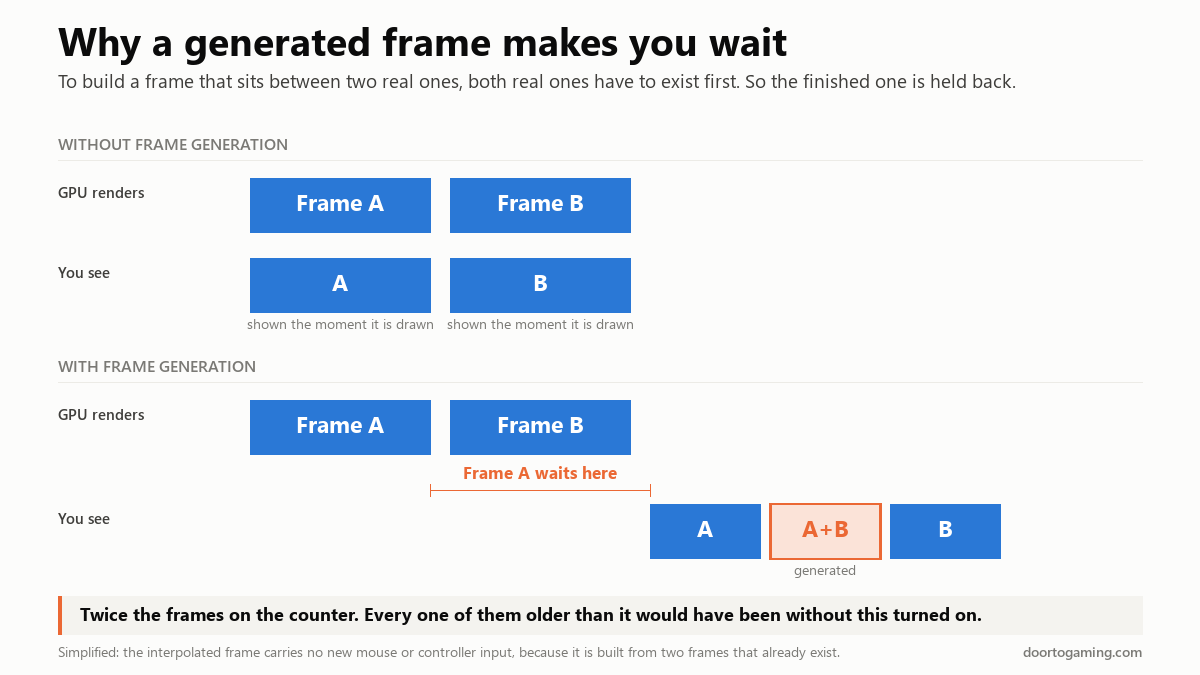
A generated frame is interpolated. It sits between two real frames, and to build something between A and B, you need both A and B in hand.
So the renderer finishes frame A — and holds it. It waits for frame B to finish rendering. It builds the in-between frame. Then it releases all three in order: A, the generated one, B.
That pause is the whole story. Frame A was finished and ready, and you weren't shown it, because the frame after it didn't exist yet. Every frame reaching your monitor is older than it would have been with the feature off.
And because the generated frame is assembled from two frames that already exist, it contains no new input. Your mouse movement between A and B isn't in it. Only real frames respond to you; generated ones are filler, however convincing they look.
That's why the FPS counter stops meaning what it used to. Half your frames — or three quarters of them at 4× — are not samples of the game's state. They're transitions between samples.
What it actually costs
With Nvidia Reflex active, the usual figure is around 8 to 12 milliseconds of added latency in most games. That isn't catastrophic, and in a slow single-player game you may genuinely not notice it.
The more interesting detail is where that cost lands. Testing across titles has found the penalty is mostly in enabling it at all, not in how far you push it. In Star Wars Outlaws, turning frame generation on cost around 6ms — and going all the way to 4× multi-frame generation added only about 2.5ms on top. Cyberpunk behaved similarly: roughly 6ms to enable, another 4ms or so for 4×.
That's a genuinely useful piece of information. If you've already accepted the latency hit, the higher multipliers are comparatively cheap. The decision that matters is on/off, not 2× versus 4×.
What Reflex does, and what it doesn't
Reflex is frequently described as cancelling out frame generation's latency. It doesn't.
What it does is shorten the render queue and tighten CPU/GPU synchronisation, which claws back latency that was being wasted elsewhere. It pulls your total system latency back toward your native baseline. It does not get you below it, and it cannot make an interpolated frame carry input it never had.
The honest framing is that Reflex makes the penalty affordable. It doesn't make it disappear.
It costs VRAM too, which matters more than it sounds
Frame generation has to hold frames in memory and run a model over them, so it carries a memory cost on top of everything else the game is doing.
Nvidia's DLSS 4 moved from the older CNN to a transformer-based model which it says is around 40% faster and uses roughly 30% less VRAM than its predecessor — a real improvement, but a reduction in a cost, not its removal.
This matters most on exactly the cards it's marketed hardest to. An 8GB GPU that's already at the edge of its buffer can be tipped over by enabling frame generation, and the result isn't a clean framerate drop — it's texture pop-in, collapsing 1% lows, and stutter, because that's what cards do when they run short of memory. You can end up with a higher FPS counter and a visibly worse-looking, worse-feeling game.
The base frame rate rule, and the inversion nobody mentions
Frame generation multiplies your existing frame rate. It does not create responsiveness that wasn't there.
Start at 60 FPS and interpolate to 120: your input latency is roughly that of a 60 FPS game plus the generation penalty. Perfectly playable. Start at 30 and interpolate to 60: you get a counter reading 60 and the input feel of something worse than 30, plus far more obvious artifacts, because the two real frames being blended are further apart in time and the model has more to invent.
The commonly cited floor is a 60 FPS base. Digital Foundry's testing suggests 40 to 60 is workable and still feels responsive. Below about 40, it's a bad trade in almost every case.
Here's the inversion: frame generation is a feature for people whose performance is already good. It's marketed, and widely understood, as a rescue for people struggling to hit playable frame rates — and that's precisely the group it serves worst. If you're at 35 FPS, the fix is lower settings, not more frames invented from the ones you already had.
Where the artifacts show up
Interpolation has to guess, and it guesses worst in a few predictable places:
- HUD and UI elements. Static overlays sitting on top of moving geometry are a hard case — the model interpolates the interface along with the background, producing shimmer or ghosting around health bars, subtitles and crosshairs.
- Fast camera movement. Quick flicks mean the two real frames share little content, so there's less to interpolate from.
- Disocclusion — areas revealed from behind an object. That content genuinely doesn't exist in either source frame.
These are much less visible at a high base frame rate, because consecutive frames are more similar. Another reason the feature rewards people who didn't need it.
So when should you use it?
Turn it on when: you're playing a single-player game, you're already at 60+ FPS, and you have a high-refresh monitor to actually display the extra frames. Slower-paced games with a controller are the ideal case — the latency penalty is least noticeable, and the smoothness gain is real.
Leave it off when: you play competitive shooters (where 10ms matters and frame-time consistency matters more), your base frame rate is under about 40, or you're on a card that's already near its VRAM limit.
And be careful comparing numbers. A benchmark with frame generation on and one with it off are not measuring the same thing, and neither is really measuring how the game feels. If you want a number that tracks smoothness honestly, use a frame-time graph and your 1% lows — we went through why the average FPS counter is such a poor instrument in detail.
One last thing worth separating: if your problem is hitching rather than low frame rate, frame generation won't help and may make it marginally worse. Stutter has its own causes, and we mapped the four different ones behind most modern stutter — none of them is solved by generating more frames on top.
The short version
- A generated frame is built between two real frames, so the first one gets held back. That delay is the latency cost, and it's inherent.
- Generated frames carry no new input. Only real frames respond to you.
- Expect roughly 8–12ms with Reflex on. Most of that is the cost of enabling it at all — going from 2× to 4× adds comparatively little.
- Reflex reduces the penalty toward your native baseline. It doesn't eliminate it.
- It costs VRAM, which can tip a marginal card into stutter and pop-in.
- Aim for a 60 FPS base, accept 40–60, avoid it below 40.
Frame generation is a good feature, honestly described: it makes a game that already runs well look considerably smoother. The problem was never the technology. It's that a frame counter is being used to sell something a frame counter cannot measure.
Tags: PC Gaming GPU Benchmarks VRAM Game Settings PC Performance Frame Generation DLSS FSR Input Latency NVIDIA Reflex
Written by Shujaat Ahmed
Shujaat Ahmed is the founder and editor of Door To Gaming. A lifelong gamer, he writes about the games, hardware, and industry news he cannot stop thinking about.