Your 8GB Graphics Card Won't Tell You It Ran Out of Memory. It'll Just Look Worse.
When an 8GB GPU runs short of VRAM it doesn't crash and often doesn't even slow down — it quietly serves lower-quality textures while the settings menu still says Ultra. That's why the 8GB debate never resolves: average frame rate is structurally blind to how these cards actually fail. Here's what the numbers show, and how to test your own card in five minutes.
By Shujaat Ahmed · · · 9 min read
There is a specific, maddening thing an 8GB graphics card does when it runs out of memory, and almost nobody describes it properly.
It does not crash. It usually does not even slow down in a way you'd notice from a frame counter. What it does is quietly stop drawing the textures you asked for. You set the game to Ultra, the menu still says Ultra, the FPS counter still says 70 — and the card is serving you lower-resolution surfaces than the settings promised, because that is the only way it can keep the buffer from overflowing.
Hardware Unboxed found exactly this while testing the RTX 5060 Ti 8GB: in some games the 8GB card was silently rendering lower-quality textures than the 16GB version of the same card, at identical settings. Not slower. Worse-looking.
That single behaviour is why the "is 8GB still enough in 2026" argument never resolves. Both sides are looking at frame rate charts, and frame rate charts are structurally incapable of showing the thing that actually went wrong.
The cleanest experiment in PC hardware
Most GPU comparisons are muddy because you're changing several variables at once — different dies, different core counts, different clocks, different bandwidth.
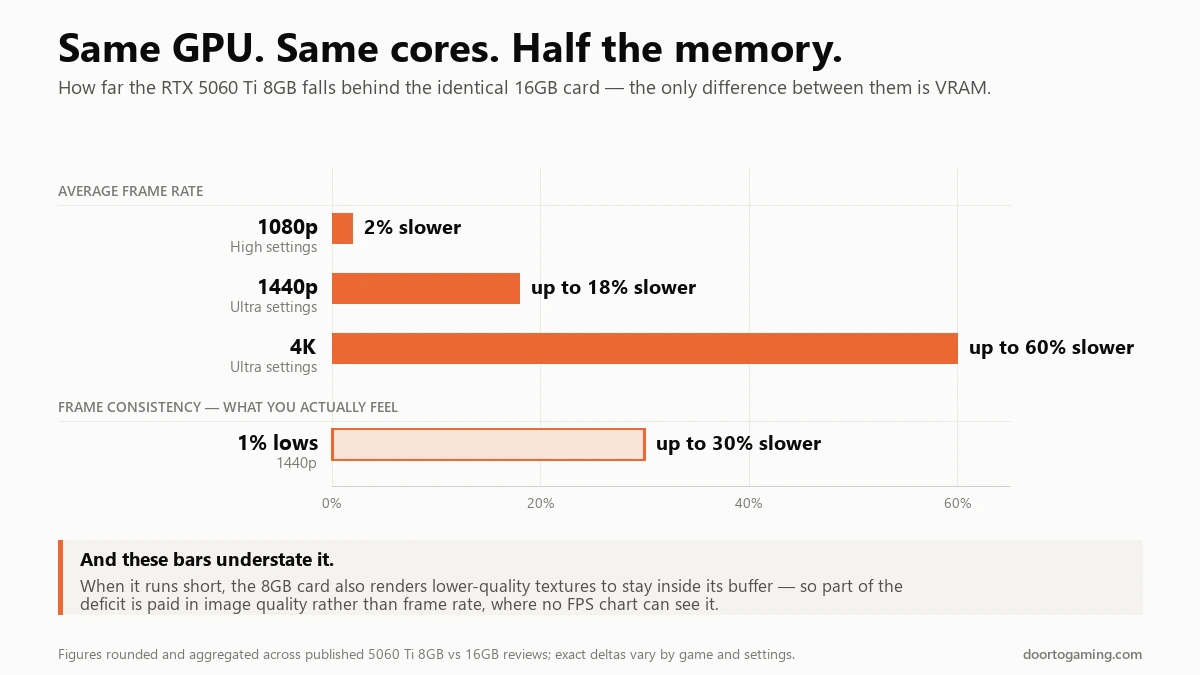
The RTX 5060 Ti is not muddy. Nvidia ships it in 8GB and 16GB versions built on the same GB206 Blackwell die, with the same core configuration, the same clocks and the same TDP. The memory capacity is the only meaningful difference. Whatever gap appears between them is VRAM, and nothing else.
The gap depends almost entirely on how hard you push the card:
- At 1080p with textures below Ultra, there is essentially no gap — reviewers have measured the 8GB card within a couple of percent of the 16GB one.
- At 1440p Ultra, the 8GB card runs roughly 18% behind on average.
- At 4K, the deficit balloons past 60%.
- On 1% lows — the stutter you actually feel — the 8GB card has been measured up to 30% worse.
- With ray tracing plus DLSS 4 frame generation, around 22% behind, because frame generation needs its own VRAM to hold the frames it's interpolating between.
That last point deserves emphasis because it runs against intuition: the features marketed as performance boosters increase memory pressure. Frame generation is not free, and on a card that is already at its ceiling it can be the thing that pushes you over.
Why both sides of the argument have evidence
8GB is not failing at a particular resolution. It is failing at a particular texture setting, and resolution only matters because it changes how much headroom is left over.
At 1080p High, 8GB is genuinely fine for the overwhelming majority of games — the people saying "I game at 1080p on 8GB and it's fine" are not wrong and are not lying. At 1080p Ultra, with the high-resolution texture packs enabled, a growing list of 2026-era games breach 8GB outright: Cyberpunk 2077, Monster Hunter Wilds, Hogwarts Legacy and Assassin's Creed Shadows have all been measured over the line. Avatar: Frontiers of Pandora wants roughly 10.7GB at 1080p Ultra and about 12.6GB at 1440p. Horizon Forbidden West asks for 9.5GB or more at 1080p Very High.
Indiana Jones and the Great Circle didn't degrade gracefully on the 5060 Ti 8GB at 1080p Ultra. It crashed.
So the honest answer to "is 8GB enough" is that it's the wrong unit of measurement. 8GB is enough for a set of settings, not for a resolution, and that set is shrinking every year — largely because Unreal Engine 5's Nanite geometry and Lumen lighting both carry real memory costs that older engines didn't.
What running out actually looks like
VRAM exhaustion has a distinctive signature, and once you know it you can't unsee it:
- Texture pop-in. Surfaces load in blurry and sharpen a second later, or never sharpen at all.
- Hitching when you turn the camera or cross into a new area — the moments that force a batch of new assets to stream in.
- Frame-time spikes that wreck your 1% lows while the average frame rate barely moves.
- Degradation that worsens the longer you play, as the buffer fills and fragments.
The mechanism is simple: when the card runs out of local memory, it starts pulling assets across the PCIe bus from system RAM, which is dramatically slower. That fetch is what you feel as a hitch. And when the driver or engine decides it would rather not do that, it drops texture quality instead — which you don't feel at all, you just get a worse-looking game without being told.
This is why average FPS is such a poor instrument here. Averages are exactly the statistic that hides brief, severe interruptions. A game that runs at a steady 70fps and a game that runs at 75fps with a 300ms hitch every time you turn around can post similar averages and feel nothing alike.
Why reviews systematically under-report this
Benchmark passes are usually 30 to 60 seconds, often on a scripted flythrough, frequently after a fresh load.
VRAM problems need time to develop. Hardware Unboxed's own observation was that a 5060 Ti 8GB could get through a benchmark run at Ultra looking respectable, and then become genuinely unplayable during extended real play once the buffer was properly saturated. The benchmark isn't wrong, it's just too short to reach the failure.
Combine that with the fact that reviewers overwhelmingly report averages, and the result is a measurement regime that is structurally kind to 8GB cards. It's not a conspiracy — it's the standard methodology quietly being a poor fit for this particular failure mode.
How to tell whether it's happening to you
Put a frame-time graph and dedicated VRAM usage on screen and watch them together for about five minutes. If VRAM sits above roughly 90% of your card's capacity while the frames hitch, it is a memory limit rather than a speed one.
1. Watch the right number. Install MSI Afterburner with RivaTuner Statistics Server, or use HWiNFO or GPU-Z, and put dedicated VRAM usage and a frame-time graph on screen. Not average FPS — frame time. If dedicated VRAM sits above roughly 90% of your card's capacity while you're getting hitches, you have your answer.
2. Read the pattern, not the number. The two common bottlenecks look different:
- Steady high GPU utilisation with a consistently lower frame rate is a compute limit. Your card simply isn't fast enough. More VRAM would not help.
- Erratic frame-time spikes, texture pop-in and hitching on movement, with GPU utilisation bouncing around, is a memory limit.
3. Run the confirmation test. Drop texture quality one notch — Ultra to High — and change nothing else. If the stuttering disappears, VRAM was your problem, conclusively. If it doesn't, stop blaming your memory and start looking at the GPU itself.
That test works because texture quality is overwhelmingly the largest single consumer of VRAM, and at 1080p the visual difference between Ultra and High textures is frequently close to invisible, while the memory saved is substantial. It is the single best settings trade in PC gaming right now, and most people never make it because "Ultra" feels like the setting you're supposed to want.
If you're hunting for where those controls live after Nvidia's software reshuffle, our guide to where every setting went when the classic Control Panel was retired covers the new locations.
So should you buy an 8GB card in 2026?
Yes at 1080p if you run High textures rather than Ultra. No at 1440p and above, no if you want Ultra textures or ray tracing, and no if you plan to keep the card three or four years. The texture setting decides this more than the resolution does.
8GB is still fine if you play at 1080p, you're willing to run High rather than Ultra textures, and you mostly play esports titles, older games or anything not built on a modern streaming-heavy engine. You will not notice a 2% deficit.
8GB is a bad buy if you play at 1440p or above, you want Ultra textures, you want ray tracing, or you intend to keep the card for three or four years. The trend line only goes one direction, and a card that is marginal today will be clearly insufficient before you replace it.
The upgrade is worth the money only if the price gap is small. When the 16GB version of the same card is a modest premium, take it — you are buying years of headroom on an otherwise identical GPU. When the gap is large, the calculus changes, and it's worth understanding why it's large: memory pricing has been dragged upward by AI datacentre demand, which we covered in why PC memory got expensive and won't get cheap again.
It's also worth noting how deliberately this capacity is being segmented. Nvidia's own product decisions have put more memory into some laptop parts than the equivalent desktop cards, which we looked at in the RTX 50 Super VRAM split. VRAM capacity is not an accident of engineering. It's a pricing lever.
The bottom line
The 8GB debate has been argued for three years with the wrong evidence, because the standard benchmark — average frame rate over a short run — is close to blind to how these cards actually fail.
They don't get slow. They get inconsistent, and they get quietly uglier, and the settings menu keeps insisting everything is set to Ultra while the card ignores you.
Which means the most useful thing you can do isn't to pick a side in the argument. It's to put a frame-time graph and a VRAM readout on your own screen, play for twenty minutes, and find out what your specific card is doing in your specific games. The answer is yours, not the benchmark's.
Tags: PC Gaming NVIDIA GPU Benchmarks VRAM 8GB VRAM RTX 5060 Ti Graphics Cards PC Building Game Settings Frame Time & Stutter
Written by Shujaat Ahmed
Shujaat Ahmed is the founder and editor of Door To Gaming. A lifelong gamer, he writes about the games, hardware, and industry news he cannot stop thinking about.