The Box Says 1 TB. Here Is How Many Games Actually Fit
Every console loses 15–29% of its advertised storage before you install a game: a 1 TB Series X leaves 802 GB, a Series S just 364. With big games now 70–150 GB, that is four or five on most consoles and two on a Series S. The real numbers, how many games fit, and the one habit that decides whether you need more.
By Shujaat Ahmed · · 6 min read
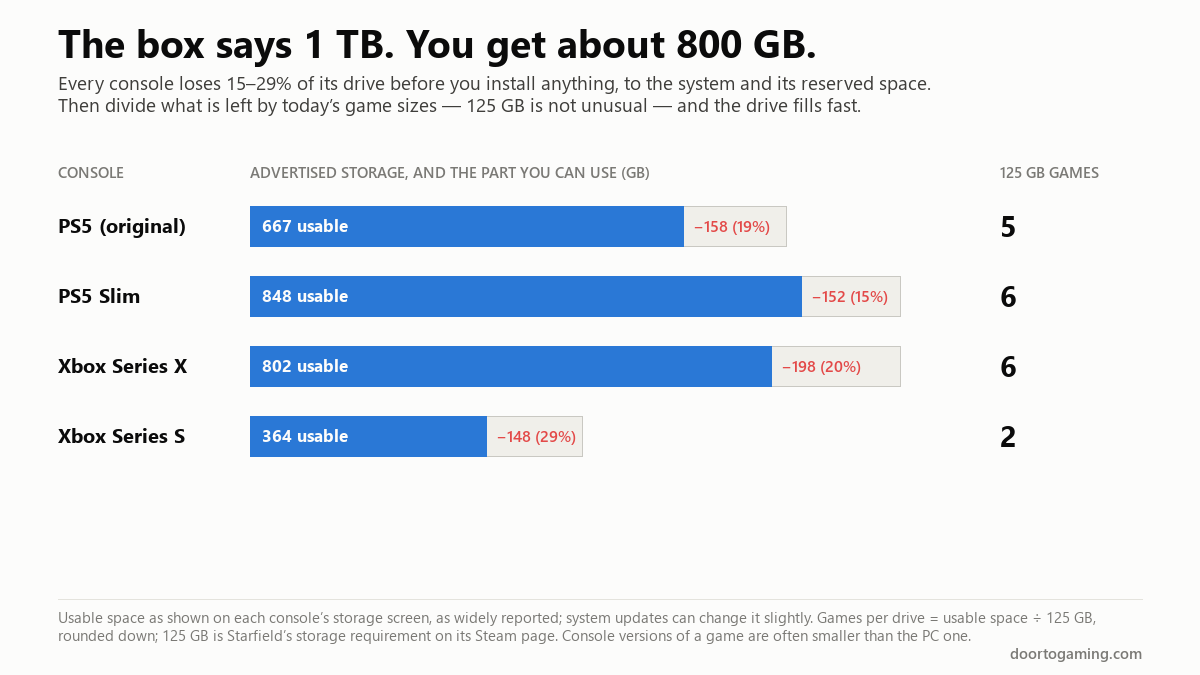
A 1 TB Xbox Series X gives you 802 GB for games. A 512 GB Series S gives you 364. The original PS5's 825 GB drive leaves 667. Every console loses 15–29% of its advertised storage before you install a single game — and then today's big games, often over 100 GB each, divide what is left into a surprisingly small number.
So how much storage do you actually need? It depends on one habit more than anything else: how many big games you keep installed at once. Here are the real numbers, and the arithmetic for working out your own.
How much space each console really has
The figures below are what each console's own storage screen shows as available on a new machine, as widely reported. System updates can move them slightly.
| Console | Advertised | Usable for games | Lost before you start |
|---|---|---|---|
| PS5 (original) | 825 GB | 667 GB | 19% |
| PS5 Slim | 1 TB | 848 GB | 15% |
| Xbox Series X | 1 TB | 802 GB | 20% |
| Xbox Series S | 512 GB | 364 GB | 29% |
The Series S loses the most proportionally because the system takes a similar amount of space on a smaller drive. And the PS5 Pro's 2 TB drive is reported at roughly 1.9 TB usable — the only current console where storage is rarely the first thing to run out.
Some of the gap is the operating system and space the console reserves for itself. Some is units: storage makers count a gigabyte as 1,000,000,000 bytes, while systems often count in binary units where a "GB" is 1,073,741,824 bytes — about 7% bigger. That is also why a 1 TB drive shows up in Windows as about 931 GB.
How big games actually are
These are the storage requirements from each game's Steam page, read in October 2026. Console versions are often somewhat smaller, but the order of magnitude is the same.
| Game | Storage required (PC) |
|---|---|
| Baldur's Gate 3 | 150 GB |
| Black Myth: Wukong | 130 GB |
| Starfield | 125 GB |
| Call of Duty | 115 GB |
| Monster Hunter Wilds | 75 GB |
| Cyberpunk 2077 | 70 GB |
Two things to notice. First, the range is wide: a 70 GB game takes half the room of a 150 GB one, so "how many games fit" depends heavily on which games. Second, these are launch-day numbers. Call of Duty's page says so outright — "115 GB available space at launch" — and live-service games in particular grow with every season of updates. We explain why install sizes have grown so large in a separate piece. And the biggest test of all is close: GTA 6 is reported at about 210 GB, which is more than half of a Series S.
How many games fit
Divide the usable space by the size of the games you play. Using a 125 GB game as a typical big modern release, and a 70 GB game as a typical smaller one:
| Console | Usable | 125 GB games | 70 GB games |
|---|---|---|---|
| PS5 (original) | 667 GB | 5 | 9 |
| PS5 Slim | 848 GB | 6 | 12 |
| Xbox Series X | 802 GB | 6 | 11 |
| Xbox Series S | 364 GB | 2 | 5 |
Those are best cases — no screenshots, no video captures, no smaller games filling the gaps. In practice, a 1 TB console holds four or five big games comfortably. A Series S holds two, which is the single most common complaint about it.
Do you need more?
Ask one question: how many big games do you keep installed at once?
If you play one or two games at a time and delete what you finish, a 1 TB console is enough. Deleting costs you nothing but a re-download later — and the re-download is shorter than people expect. On a 100 Mbps line, a 125 GB game takes about 2 hours 47 minutes to come back; at 300 Mbps, under an hour. Our download-speed guide has the arithmetic for your own connection.
If you rotate between several big games — a live-service shooter, a long RPG, whatever is new on Game Pass — you will spend your time managing the drive, and more storage is worth buying.
If your connection is slow or has a data cap, deleting stops being free. Every re-download of a 125 GB game is 125 GB off your allowance. In that case, more storage is worth more to you than to almost anyone else.
Adding storage, by console
Both current consoles can be expanded, with one important rule each.
PS5 and PS5 Slim: there is an internal expansion slot that takes a standard M.2 NVMe SSD, and PS5 games can be played directly from it. A USB external drive can store PS5 games, but they have to be moved back to internal storage to play. PS4 games run straight from USB.
Xbox Series X|S: Series X|S games run from the internal drive or the official Storage Expansion Card, which slots into the back. A USB drive can play Xbox One and Xbox 360 games directly, and can store Series X|S games, but not run them.
So on both consoles, the cheap USB drive is a good parking space for games you are not currently playing — moving a game from USB is much faster than downloading it — and the faster internal options are for the games you play now.
On PC
The same arithmetic applies, with two differences. You choose the drive, and nothing stops you having several.
A 1 TB SSD shows up in Windows as about 931 GB, and Windows itself, your other programs and your files take their share before any game. With current game sizes, 2 TB is a sensible minimum for a PC that keeps a few big games installed, and a second drive is an easy upgrade later. More games now list an SSD outright — Call of Duty's Steam page specifies "SSD with 115 GB available space" — so a large hard drive works for storage, but is a poor place to play from.
The short version
- Consoles lose 15–29% of their advertised storage before you install anything: PS5 667 GB of 825, PS5 Slim 848 of 1,000, Series X 802 of 1,000, Series S 364 of 512.
- Big games are commonly 70–150 GB on PC, and live-service games grow after launch.
- A 1 TB console fits four or five big games; a Series S fits two.
- If you delete what you finish, 1 TB is enough — a 125 GB re-download is about 2 h 47 min at 100 Mbps.
- If you rotate several big games, or your internet is slow or capped, buy more storage.
- To expand: an M.2 SSD on PS5, the Storage Expansion Card on Xbox. USB drives are fine for parking games, but on both consoles current-gen games must be moved off them to play.
Tags: PC Gaming xbox series x PS5 Game Install Size Storage SSD NVMe Xbox Series S PS5 Slim Storage Expansion Card
Written by Shujaat Ahmed
Shujaat Ahmed is the founder and editor of Door To Gaming. A lifelong gamer, he writes about the games, hardware, and industry news he cannot stop thinking about.