Miss 60 FPS by a Hair and V-Sync Hands You 30
Your GPU takes one hundredth of a millisecond too long and V-Sync does not give you 59 frames — it gives you 30, because a finished frame can only go on screen at a refresh boundary and the next one is a whole interval away. The mechanism, what VRR actually changes, and why the fix is a frame cap three below your refresh rate.
By Shujaat Ahmed · · 8 min read
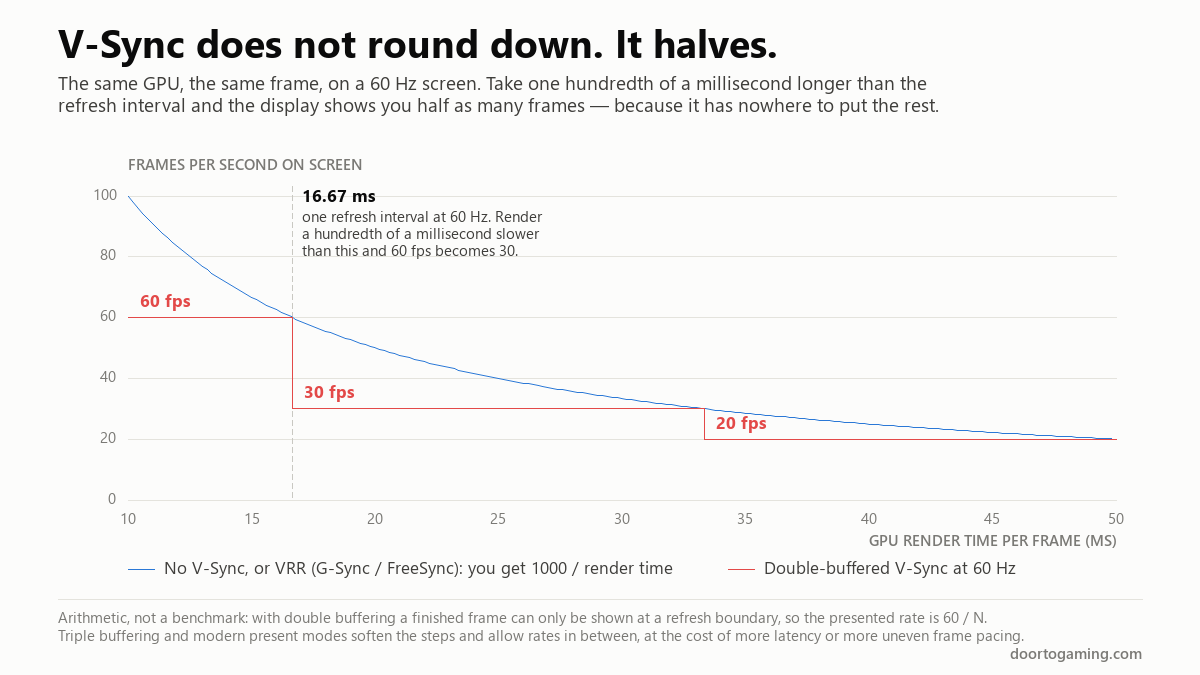
Your GPU renders a frame in 16.68 milliseconds. The refresh interval on a 60 Hz screen is 16.67. You missed by one hundredth of a millisecond — six hundredths of one percent.
V-Sync does not hand you 59 frames per second for that. It hands you 30.
That cliff is the single most confusing thing about display settings, and almost every explanation of V-Sync skips it in favour of "it stops tearing but adds input lag." Both halves of that are true and neither tells you why the game suddenly feels like a different game. Here is the mechanism, what variable refresh actually changes, and why the fix is a number three below your refresh rate.
What V-Sync is actually for
A monitor does not display an image. It redraws one, on a fixed clock, scanning from the top of the panel to the bottom. At 60 Hz that happens every 16.67 ms whether or not anything new has arrived.
Your GPU renders into a buffer, and when a frame is finished it swaps that buffer in. With no synchronisation it swaps the instant the frame is ready — including halfway through a scan. The top of your screen then shows the old frame and the bottom shows the new one, with a visible horizontal seam where they meet. That is tearing, and on a fast pan it can be two or three seams at once.
V-Sync holds the swap until the scan finishes. No seam, because the display only ever reads one complete frame.
That is the entire feature. Everything people complain about is a consequence of the waiting.
Why the frame rate halves instead of dipping
With double buffering there are two buffers: one the display is reading, one the GPU is drawing into. The GPU cannot start the next frame until its buffer is free, and the buffer is not free until the swap happens, and the swap only happens at a refresh boundary.
So a frame can only ever appear at a multiple of the refresh interval. Not near one. On one.
That means the frame rate you actually see can only be the refresh rate divided by a whole number:
- 60 Hz: 60, 30, 20, 15, 12
- 144 Hz: 144, 72, 48, 36, 28.8
- 240 Hz: 240, 120, 80, 60, 48
There is nothing in between. Not 59, not 45, not 50. At 60 Hz, a frame that takes 16.67 ms is shown at 60 fps and a frame that takes 16.68 ms waits for the following refresh and is shown at 30. A 0.06% increase in render time costs you 50% of your frame rate.
This is why "it was fine, then it fell apart" is the normal experience of V-Sync rather than an unlucky one. You are not sliding down a slope. You are standing on the edge of one.
It also explains a complaint that sounds irrational: that turning V-Sync on made the game slower than the tearing did. It did. If your GPU was managing 55 fps uncapped, V-Sync at 60 Hz gives you 30.
What triple buffering changes, and what it doesn't
Add a third buffer and the GPU no longer has to stall. It can begin the next frame immediately while one finished frame waits to be shown, so the output is not locked to refresh/N and intermediate rates become possible again.
What triple buffering does not do is make the trade disappear. You now have a finished frame sitting in a queue waiting its turn, which is latency by another name, and frame pacing can get less even rather than more. Modern present modes and driver options behave differently again — Nvidia's Fast Sync and Vulkan's mailbox mode both discard stale frames rather than queueing them, which trades throughput for freshness.
The staircase is the clean, double-buffered case. Treat it as the shape of the problem, not a promise about what your specific game does.
What VRR does differently
Variable refresh rate — G-Sync on Nvidia, FreeSync on AMD, and the VESA Adaptive-Sync standard underneath both — inverts the relationship.
Instead of the GPU waiting for the display's clock, the display waits for the GPU. The panel holds the current image and begins its next refresh when a frame actually arrives. A frame that takes 16.68 ms is shown after 16.68 ms. One that takes 22 ms is shown after 22 ms.
No tearing, because the refresh still starts cleanly. No quantisation, because there is no fixed boundary to miss. No systematic waiting, so no added latency from the waiting.
This is why VRR is not a tweak — it removes the cause rather than managing the symptom. If your monitor supports it and you have not turned it on, that is the single biggest improvement available on this page.
The VRR window, and what happens at the edges
VRR works across a range, not everywhere. A typical monitor might do 48–144 Hz. Outside that window the old rules come back.
Above the ceiling. If your GPU produces frames faster than the panel's maximum refresh, there is no slack left to stretch. You fall back to whatever your V-Sync setting says: on means waiting, which is latency, and off means tearing. This is the edge that matters most, because it is the one you hit in menus, on loading screens and in any older or less demanding game.
Below the floor. Drop under the minimum and the panel cannot refresh slowly enough. Low Framerate Compensation handles this by showing each frame more than once — at 35 fps on a 48–144 Hz panel, each frame is displayed twice for an effective 70 Hz, which is inside the window. LFC needs headroom to work: the maximum has to be at least double the minimum. A 30–60 Hz panel can do it; a 31–60 Hz panel cannot, which is a genuinely silly-looking specification until you know the rule. AMD suggests a ratio nearer 2.5x for clean behaviour.
LFC keeps the image synchronised. It does not make 35 fps feel like 70 — the frames are duplicates, not new information.
Why you cap below your refresh rate
The ceiling is the problem worth solving, and the fix is to never reach it.
Blur Busters' G-Sync 101 testing is the reference work here, and its conclusion is a frame cap a few frames per second under your maximum refresh. Their measurements found no further benefit below roughly 2 fps under, and capping much lower than needed slightly increases latency, because longer frame times mean slower delivery. The newer rule of thumb scales with refresh rate — around 3% — which matters at the top end:
- 60 Hz: cap at 57
- 144 Hz: cap at 141, or 140 on the 3% rule
- 240 Hz: cap at 237, or 233
- 360 Hz: cap at 357 on the old rule, but nearer 349 on the 3% one
At 144 Hz the two rules agree closely enough that either works. At 360 Hz they are ten frames apart, and the percentage version is the one to follow.
Leave V-Sync on alongside VRR. This surprises people, but inside the VRR range it never engages, so it costs nothing — it is there to catch the frames that land exactly at the boundary, which would otherwise tear. VRR plus V-Sync plus a cap is the combination, not a choice between them.
The settings, in order
- Turn VRR on, in the monitor's own menu as well as the driver. Plenty of panels ship with it disabled, and the driver toggle cannot enable what the display is refusing to do.
- Turn V-Sync on in the driver, not usually in the game. The driver-level setting is the one that interacts correctly with VRR.
- Cap your frame rate 3 below your refresh, or 3% below on a high-refresh panel. Use the driver's limiter or the game's; both are fine, and an in-engine limiter is often slightly better.
- Turn on Nvidia Reflex or AMD Anti-Lag if the game offers it. It shortens the render queue, which is a different latency source than anything above.
- Leave Fast Sync and Enhanced Sync off when VRR is on. They operate near the maximum refresh and work against the cap you just set.
If frames still arrive unevenly after all of that, the problem is not synchronisation — it is the frames themselves, and frame time rather than frame rate is what will show you. The four causes of Unreal Engine 5 stutter are the usual suspects, and none of them are fixed by a display setting.
Two related things worth knowing. Frame generation interacts with all of this, because the frames it inserts still have to be presented inside the same window, and it needs a decent base frame rate before it helps. And if you are wondering what frame rate you need before turning on something expensive, shaders in Minecraft are a clean worked example — roughly triple the frame time, so roughly triple the headroom.
The short version
- A display redraws on a fixed clock. Tearing is a frame swapped in mid-scan; V-Sync prevents it by waiting.
- With double buffering, waiting means the frame rate can only be refresh divided by a whole number. At 60 Hz that is 60, 30, 20 — nothing between.
- So missing the interval by 0.06% costs half your frame rate. That cliff, not the average latency, is what people are feeling.
- VRR inverts it: the display waits for the GPU instead. No tearing, no quantisation, no systematic lag.
- VRR only works inside its range. Above the ceiling you are back to tearing or waiting, which is why you cap 3 fps — or 3% — below your refresh rate.
- Below the floor, LFC repeats frames to stay in range. It needs the maximum to be at least double the minimum.
- VRR on, V-Sync on, frame cap just below refresh. All three, not one of them.
Tags: Frame Time VSync VRR G-Sync FreeSync variable refresh rate screen tearing frame cap refresh rate input lag PC gaming performance monitor settings
Written by Shujaat Ahmed
Shujaat Ahmed is the founder and editor of Door To Gaming. A lifelong gamer, he writes about the games, hardware, and industry news he cannot stop thinking about.